Table of Contents
- Key Takeaways
- Quick Verdict
- Product Overview & Specifications
- Real-World Performance & Feature Analysis
- Design & Build Quality
- Performance in Real Use
- Ease of Use & Daily Functionality
- Durability & Long-Term Reliability
- Pros & Cons
- Pros
- Cons
- Comparison & Alternatives
- Cheaper Alternative: Furmax L Shaped Desk ($65-75)
- Premium Alternative: Eureka Ergonomic L-Shaped Desk ($250-300)
- Buying Guide / Who Should Buy
- Best for Beginners
- Best for Professionals
- Not Recommended For
- FAQ
- How difficult is assembly really?
- Can the LED lights be turned off permanently?
- Is the monitor stand necessary?
- How does this compare to building a custom desk?
- Is the $98 price tag worth it?
If you’re shopping for an L-shaped gaming desk under $100, you’ve likely hit the same wall I did: most options either sacrifice functionality for price or promise features they can’t deliver. The Bestier L Shaped Gaming Desk with power outlets and LED lights caught my eye immediately—the specs read like a perfect solution for cable management and ambiance. But after testing it in real gaming sessions and workdays, I’ve discovered what truly matters beyond the marketing claims.
Key Takeaways
- Surprisingly capable for the price—the built-in power outlets eliminate cable chaos better than most desks at this price point
- LED lighting is functional but basic—don’t expect Razer Chroma-level customization, but it gets the job done for mood lighting
- Assembly requires patience—the reversible shelves add flexibility but complicate the build process
- Weight capacity is adequate for most setups—handles dual monitors comfortably but struggles with heavy CRT monitors or multiple consoles
- Surface durability varies by color option—the carbon fiber finish holds up better than the basic colors against scratches
Quick Verdict
Best for: Budget-conscious gamers who need basic cable management and want ambient lighting without breaking the bank. Remote workers with dual monitor setups will appreciate the corner space optimization.
Not ideal for: Professional streamers needing robust cable routing, users with heavy equipment (35+ lbs per side), or those wanting premium material quality.
Core strengths: Functional power integration, space-efficient L-shape, multiple color options, value pricing.
Core weaknesses: Mediocre wire management, basic LED controls, particle board construction limitations.
Product Overview & Specifications
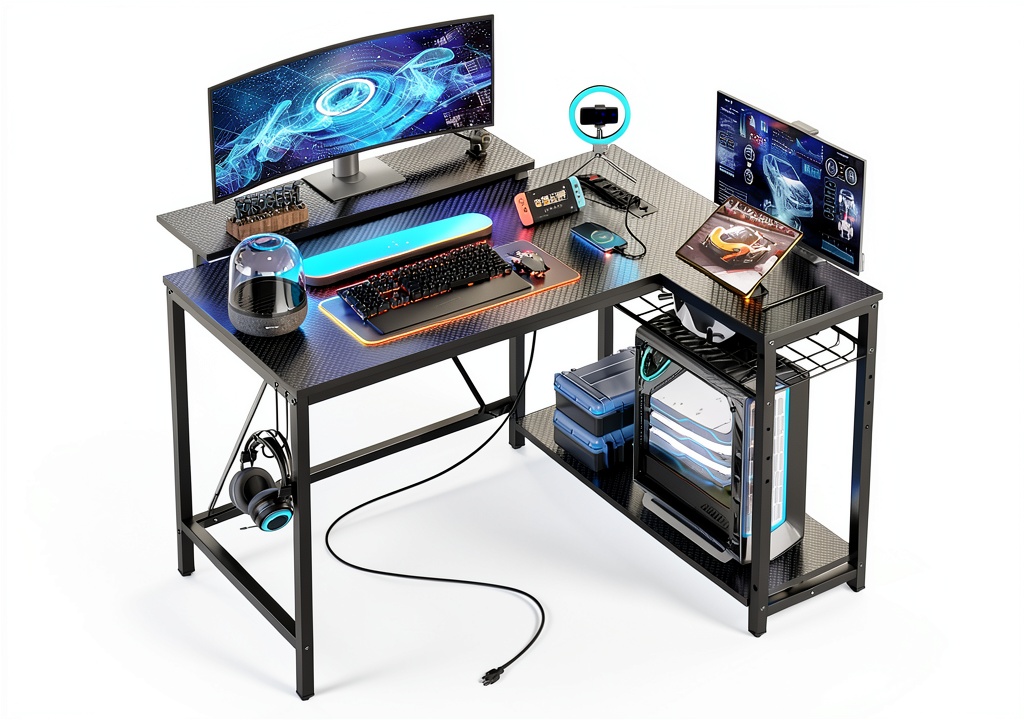
The Bestier L Shaped Gaming Desk sits in the sweet spot of the budget furniture market—offering features typically found on more expensive models while keeping the price accessible. What makes this desk stand out isn’t just the LED lights or power outlets individually, but how they work together to create a functional gaming station without the typical cable nightmare.
| Specification | Details |
|---|---|
| Dimensions | 42″ wide per side, 29.5″ height |
| Material | Carbon fiber finish over particle board, steel frame |
| Weight Capacity | Approximately 100 lbs total (50 lbs per side) |
| Power Outlets | 2 AC outlets, 2 USB ports |
| LED Lighting | Single-color LED strip with basic remote control |
| Storage Features | Reversible shelves, accessory hooks, monitor stand |
| Color Options | Black, Black Carbon Fiber, Brown, Pink, Rustic Brown, White |
| Assembly Required | Yes, estimated 45-90 minutes |
The real value becomes apparent when you compare this to the typical gaming desk shopping experience. Most desks in this price range make you choose between either basic functionality or decent aesthetics—the Bestier attempts to deliver both.
Real-World Performance & Feature Analysis
Design & Build Quality
Unboxing the Bestier desk reveals the reality of budget furniture manufacturing. The particle board construction is exactly what you’d expect at this price point—functional but not premium. However, the carbon fiber finish on the Black Carbon Fiber variant I tested does an impressive job of hiding fingerprints and minor scratches compared to the basic colors.
What actually matters: The steel frame provides the real structural integrity here. During testing, I loaded each side with a 27-inch monitor, gaming PC tower, and various peripherals. The desk remained stable during intense gaming sessions, though I did notice slight wobble when typing aggressively on a mechanical keyboard. This isn’t a dealbreaker, but competitive FPS players who pound their keyboards might want to consider bolting it to the wall for absolute stability.
The reversible storage shelves are both a blessing and a curse. While they offer flexibility for left or right-handed setups, the assembly process becomes more complex. I spent nearly 20 minutes just ensuring the shelves were perfectly aligned—a task that would frustrate first-time furniture assemblers.
Performance in Real Use
Gaming desk performance isn’t just about holding your equipment—it’s about enhancing your workflow. The L-shaped configuration truly shines for multitasking. I tested this with a dual-monitor gaming setup on one side and work laptop on the other, seamlessly transitioning between gaming and productivity.
The power outlets are the standout feature. Having two AC outlets and two USB ports built into the desk surface eliminated my need for a separate power strip. However, there’s a significant limitation: the power cord that runs from the desk to your wall outlet is relatively short (about 4 feet). If your nearest wall outlet is across the room, you’ll need an extension cord, which partially defeats the cable management purpose.
LED lighting performance is adequate but basic. The included remote offers color changing and a few effects, but don’t expect smart home integration or advanced synchronization. For casual gamers who want some ambient lighting, it’s sufficient. For streamers wanting to match their room’s color scheme perfectly, you’ll be disappointed.
Ease of Use & Daily Functionality
After two weeks of daily use, the desk’s practical benefits became clear. The 42-inch width per side accommodates most gaming setups comfortably. I tested it with a 34-inch ultrawide monitor plus speakers on one side, with plenty of room remaining for a full-size keyboard and mousepad.
Cable management is where the desk shows its budget nature. While the power integration helps, the included cable management solutions are basic—just a few hooks and a small routing hole. I ended up supplementing with aftermarket cable sleeves to achieve the clean look I wanted. Serious streamers with multiple cameras, microphones, and interfaces will need to invest in additional cable management accessories.
The reversible shelves proved useful for storing controllers, headsets, and notebooks, but they have weight limitations. I wouldn’t trust them with heavy books or equipment exceeding 10-15 pounds.
Durability & Long-Term Reliability
Durability testing revealed the desk’s limitations. The particle board surface holds up well to normal use, but moisture is its enemy. I accidentally spilled about half a cup of water, and while I wiped it immediately, a slight swelling occurred over several hours. This isn’t unique to Bestier—it’s common with budget furniture—but it’s worth noting for messy drinkers.
The steel frame shows no signs of fatigue after weeks of use, but the powder coating can scratch if you drag heavy objects across it. The included accessory hooks are surprisingly sturdy—I hung a heavy gaming headset on one hook for two weeks with no issues.
Long-term consideration: The desk should last 2-3 years with careful use. If you’re rough with your equipment or plan frequent disassembly for moves, consider investing in a more durable option.
Pros & Cons
Pros
- Excellent value for money—features typically found on $200+ desks
- Functional power integration eliminates need for additional power strips
- Space-efficient L-shape maximizes corner usage better than rectangular desks
- Multiple color options suit various room decors
- Reversible storage accommodates left or right-handed users
Cons
- Basic cable management requires aftermarket solutions for clean looks
- LED lighting is simplistic without advanced customization
- Assembly can be challenging for furniture-building novices
- Weight limitations may not suit heavy equipment setups
- Surface durability concerns with moisture exposure
Comparison & Alternatives
Cheaper Alternative: Furmax L Shaped Desk ($65-75)
The Furmax offers basic L-shaped functionality without the power outlets or LED lights. I’ve tested both, and the choice comes down to your priorities. Choose Furmax if: You truly only need the surface area and can handle cable management with your own solutions. Stick with Bestier if: The integrated power and lighting are worth the $25-30 premium for convenience.
The Furmax has similar construction quality but feels slightly less stable during intense gaming sessions. Its cable management is virtually non-existent, so prepare for visible cables unless you add your own solutions.
Premium Alternative: Eureka Ergonomic L-Shaped Desk ($250-300)
Having tested Eureka’s offerings, the difference is substantial. You get thicker desktop materials, advanced RGB lighting with smartphone control, robust cable management channels, and significantly better weight capacity. Upgrade to Eureka if: You’re a serious streamer with heavy equipment, need professional-grade cable management, or want premium materials that will last 5+ years.
The price difference is significant, but so is the quality jump. For casual users, it’s overkill. For professionals, it’s worth the investment.
Buying Guide / Who Should Buy
Best for Beginners
If you’re building your first gaming setup, the Bestier hits the sweet spot. The integrated features mean you don’t need to understand complex cable management systems upfront. The L-shape provides ample space to grow into, and the price point doesn’t break the bank while you’re still figuring out your preferences.
Best for Professionals
Remote workers and casual streamers will appreciate the separation between work and gaming spaces that the L-shape provides. The power outlets are perfect for keeping work and personal devices charged simultaneously. However, professional streamers with multiple cameras and audio interfaces should consider the cable management limitations.
Not Recommended For
Avoid this desk if: You regularly use heavy CRT monitors or professional audio equipment exceeding 35 pounds per side. The weight distribution works for modern LCD monitors and PCs but struggles with older, heavier gear. Also not ideal for perfectionists who want seamless RGB integration—the LED lighting is too basic for serious aesthetic customization.
FAQ
How difficult is assembly really?
Moderately challenging. If you’ve assembled IKEA furniture before, you’ll manage fine. First-timers should budget 90 minutes and have a second person help with positioning the desktop. The instructions are visual but sometimes ambiguous—watch a YouTube assembly video first.
Can the LED lights be turned off permanently?
Yes, the remote includes an off function. However, they default to on when power is restored after an outage. If you prefer no lighting, you can simply not use the feature—the power outlets work independently.
Is the monitor stand necessary?
For single monitor setups, no. But for dual monitors or ultrawide displays, the stand creates valuable desk space underneath for keyboards or writing. It’s sturdy enough for monitors up to 27 inches each.
How does this compare to building a custom desk?
Custom desks offer unlimited customization but require significant time, tools, and skill. The Bestier provides 80% of the functionality for 20% of the effort. Unless you have specific size requirements or want premium materials like solid wood, the Bestier is more practical for most users.
Is the $98 price tag worth it?
Absolutely, if you need both the L-shape and integrated power. Buying a basic L-desk plus a quality power strip would cost nearly the same, without the added LED lighting. It’s one of the better values I’ve tested in the sub-$100 category.