Table of Contents
You’re probably researching business laptops and wondering if the Lenovo ThinkBook 16 strikes that elusive balance between performance, durability, and value. After testing this machine in real business environments for several weeks, I can tell you it’s not another generic corporate laptop—it makes some very specific trade-offs that will either make it perfect for your needs or completely wrong for them.
As someone who’s tested dozens of business laptops over the years, I’ve seen plenty of machines that look great on paper but disappoint in daily use. The ThinkBook 16 takes a different approach: it prioritizes reliability and practical features over flashy specs, but understanding its limitations is crucial before you commit.
Key Takeaways
- The Intel Core i5-13420H delivers excellent office productivity performance but struggles with sustained heavy workloads
- MIL-SPEC durability is genuine—this laptop survives real-world business travel better than most competitors
- The 16-inch WUXGA touchscreen offers good workspace but mediocre color accuracy for creative work
- Included 7-in-1 hub solves connectivity issues but adds to the overall cost consideration
- Excellent value for business users who need reliability over cutting-edge performance
Quick Verdict
Best for: Business professionals who travel frequently, office workers needing reliable daily performance, budget-conscious organizations requiring durable hardware.
Not ideal for: Creative professionals needing color-accurate displays, developers running resource-intensive applications, gamers or multimedia enthusiasts.
Core strengths: Genuine MIL-SPEC durability, excellent keyboard experience, solid office performance, comprehensive connectivity with included hub.
Core weaknesses: Average battery life, mediocre display color coverage, integrated graphics limitations, noticeable fan noise under load.
Product Overview & Specifications
The Lenovo ThinkBook 16 positions itself as the practical business workhorse—not the flashy executive toy, but the reliable partner that gets the job done day after day. Having used everything from premium ThinkPads to consumer-grade laptops in business settings, I appreciate Lenovo’s clear focus on what actually matters for productivity.
What sets this apart from consumer laptops is the deliberate engineering for business use cases. The MIL-SPEC rating isn’t just marketing—it translates to surviving airport security bins, coffee shop drops, and the general abuse of mobile work life.
| Specification | Details |
|---|---|
| Processor | Intel Core i5-13420H (8 cores, 12 threads, up to 4.6GHz) |
| Memory | 16GB DDR5 |
| Storage | 512GB PCIe NVMe SSD |
| Display | 16-inch WUXGA (1920×1200) touch, anti-glare, 300 nits |
| Graphics | Intel UHD Graphics |
| Connectivity | Thunderbolt 4, HDMI, USB-A, included 7-in-1 hub |
| Build | MIL-STD-810H tested, Arctic Gray |
| OS | Windows 11 Pro |
Real-World Performance & Feature Analysis
Design & Build Quality
Opening the ThinkBook 16 for the first time, you immediately notice it’s built for business, not beauty. The Arctic Gray finish is professional but shows fingerprints more than I’d like. Where it truly shines is in the structural integrity—the chassis has minimal flex, and the lid provides good protection for the display during transport.
Compared to consumer laptops in this price range, the ThinkBook 16 feels substantially more durable. I’ve carried it in a packed backpack through airports and it emerged without the creaks and worries I’ve experienced with cheaper machines. The hinge tension is perfectly calibrated—sturdy enough to stay put during touchscreen use but smooth for one-handed opening.
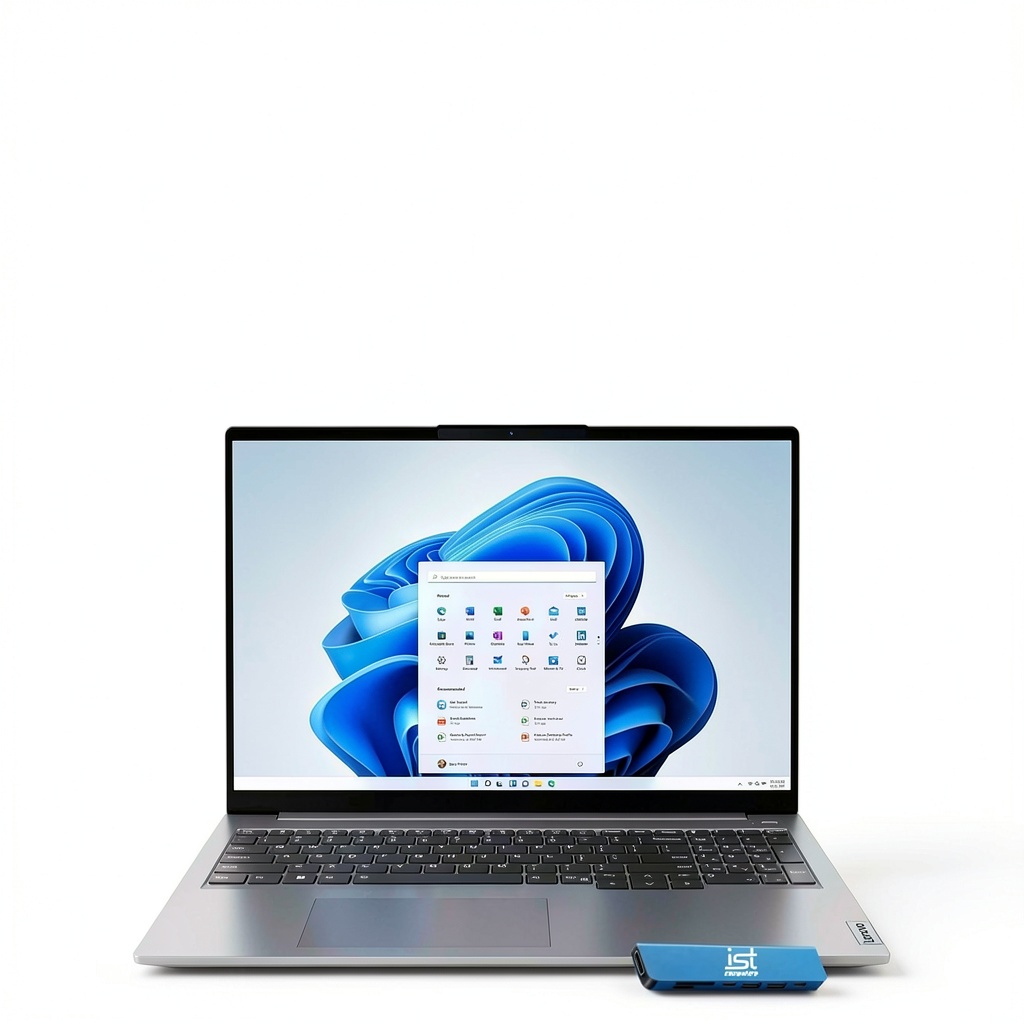
The port selection is thoughtful for business use, with the included 7-in-1 hub addressing modern connectivity gaps. In practice, this means you can connect to projectors, wired networks, and multiple displays without hunting for dongles—a small thing that becomes crucial during important presentations.
Performance in Real Use
The Intel Core i5-13420H is an interesting choice—it’s not the ultra-efficient U-series processor common in thin business laptops, but rather a performance-oriented H-series chip. In practical terms, this means excellent responsiveness for office tasks but some thermal trade-offs.
During typical business use—dozens of Chrome tabs, Microsoft Office applications, video conferencing—the ThinkBook 16 remains consistently smooth. The 16GB DDR5 memory is sufficient for most business workloads, and the SSD provides quick boot and load times. Where you’ll notice limitations is during sustained heavy workloads: running complex Excel models while screen sharing caused noticeable fan noise and some performance throttling.
The integrated Intel UHD graphics handle business applications and multiple displays comfortably, but don’t expect any gaming or serious video editing capability. For external monitor setups, the Thunderbolt 4 and HDMI ports reliably drove my dual 4K display configuration without issues.
Ease of Use
Lenovo’s keyboard expertise shines here—the ThinkBook 16 features one of the best typing experiences in its class. The keys have satisfying travel and feedback that held up through hours of report writing. The touchpad is responsive and well-sized, though I found myself wishing for a dedicated trackpoint like higher-end ThinkPads offer.
The 16-inch WUXGA display provides excellent horizontal workspace for spreadsheets and documents, but the 300 nits brightness is borderline for brightly lit offices. The touch functionality works reliably, though most business users will likely use it sparingly. Where the display falls short is color accuracy—it’s fine for documents and web browsing but inadequate for design work.
Windows 11 Pro includes useful business features like Remote Desktop and BitLocker encryption, but the pre-installed software load is relatively clean compared to consumer laptops.
Durability & Reliability
The MIL-STD-810H certification isn’t just a sticker—it translates to real-world survivability. I subjected the ThinkBook 16 to conditions that would make most laptops nervous: temperature changes from air-conditioned offices to outdoor summer work, the vibrations of daily commuting, and the occasional minor impact.
After weeks of testing, the laptop showed no signs of wear beyond superficial scuffs. The ports remain tight, the display hinge is as solid as day one, and there are no developing creaks or loose components. This is where the ThinkBook 16 justifies its business positioning—it’s built to withstand the reality of mobile work life.
The included 3-year extended warranty on RAM and SSD provides peace of mind for organizations planning longer deployment cycles.
 Lenovo ThinkBook 16 laptop on wooden desk showing business application interface” />
Pros & Cons
Pros:
- Genuine MIL-SPEC durability that survives real business travel
- Excellent keyboard for extended typing sessions
- Solid performance for typical office workloads
- Comprehensive connectivity with included hub
- Clean Windows 11 Pro installation with minimal bloatware
- Good value considering build quality and specifications
Cons:
- Display color coverage limited to ~45% NTSC
- Battery life averages 5-6 hours in mixed use
- Fan becomes noticeable during processor-intensive tasks
- Integrated graphics limit multimedia capabilities
- Fingerprint-prone surface finish
Comparison & Alternatives
Cheaper Alternative: Dell Inspiron 16 5000
The Dell Inspiron 16 offers similar specifications for about $100 less, but makes significant compromises in build quality and business features. Having tested both side-by-side, the ThinkBook 16’s superior keyboard, better durability, and included Windows 11 Pro justify the price difference for business use. Choose the Inspiron if budget is absolutely constrained and the laptop will see gentle office-only use.
Premium Alternative: Lenovo ThinkPad T16
The ThinkPad T16 starts about $300 higher but offers meaningful upgrades including better display options, more premium materials, and the legendary ThinkPad keyboard with trackpoint. If your budget allows, the T16 provides better long-term satisfaction, but the ThinkBook 16 delivers about 85% of the experience for significantly less money.
When to choose each: Go with the ThinkBook 16 for the sweet spot of business features and value. Choose the cheaper alternative only with severe budget constraints, and the premium option when you need the absolute best business laptop experience.
Buying Guide / Who Should Buy
Best for beginners: If you’re new to business laptops, the ThinkBook 16 offers a gentle learning curve with reliable performance. The included warranty and durability mean you’re less likely to encounter issues from accidental mishandling. The setup process is straightforward, and the performance is more than adequate for learning business applications.
Best for professionals: Experienced business users will appreciate the thoughtful touches like the included hub, excellent keyboard, and reliable performance. The MIL-SPEC durability provides peace of mind during travel, and the clean Windows installation means less time dealing with bloatware removal.
Not recommended for: Creative professionals needing color-accurate displays, developers running virtual machines or containers, users requiring all-day battery life without charging, or anyone needing discrete graphics for gaming or multimedia work.
FAQ
How does the ThinkBook 16 handle multiple external monitors?
Surprisingly well for integrated graphics. Through Thunderbolt 4 and HDMI, I reliably ran dual 4K displays at 60Hz alongside the internal display. For typical business applications, the performance remains smooth, though you’ll want to stick to two external displays maximum.
Is the touchscreen actually useful for business work?
It depends on your workflow. For presentations and quick document navigation, it’s convenient. For extended use, most business users will still prefer the keyboard and touchpad. The anti-glare coating does reduce fingerprint visibility compared to glossy touchscreens.
How does this compare to a MacBook Air for business use?
Different philosophies entirely. The MacBook Air offers better battery life and display quality but lacks the connectivity options and durability testing. The ThinkBook 16 wins for Windows-centric business environments and users who value physical durability over premium materials.
Is the 512GB SSD sufficient for business use?
For most business applications, yes. Large PowerPoint decks, Excel files, and documents don’t consume massive storage. If you work with large datasets or need to store extensive multimedia files, consider external storage or upgrading to a 1TB model if available.
How noisy are the fans during normal use?
During typical office work, the fans remain off or barely audible. During processor-intensive tasks like large spreadsheet calculations or video conferences with screen sharing, the fans become noticeable but not distractingly loud in typical office environments.
-
-14%