Table of Contents
I’ve tested nearly every digital writing tool on the market, from basic e-ink tablets to full-featured iPads with keyboard attachments. Each promises to revolutionize how we capture thoughts, but most fall short in some critical way—either they’re too distracting, too limited, or too complicated to use seamlessly. The reMarkable Paper Pro with Type Folio attempts to solve this by blending the tactile satisfaction of handwriting with the efficiency of typing, all within a single, focused device.
After weeks of using this as my primary note-taking device across meetings, research sessions, and creative work, I’ve discovered where it genuinely excels and where it makes significant trade-offs that might surprise you. This isn’t another generic product summary—this is what actually happens when you integrate this tool into your daily workflow.
Key Takeaways
- Seamless input switching is the standout feature—being able to handwrite diagrams and type explanations on the same page transforms workflow
- Zero setup required means the keyboard works immediately without Bluetooth pairing or charging concerns
- The paper-like display genuinely reduces eye strain during extended writing sessions compared to traditional tablets
- Limited ecosystem means you’re buying into a specific workflow—this isn’t a general-purpose computing device
- Premium pricing positions it against both basic e-ink tablets and entry-level iPads, creating a specific value proposition
Quick Verdict
Best for: Writers, researchers, students, and professionals who need extended focused writing sessions without digital distractions and value the ability to seamlessly mix handwriting and typing.
Not ideal for: Users who need color displays, extensive app ecosystems, multimedia capabilities, or tight integration with other productivity platforms beyond basic document export.
Core strengths: Unmatched input flexibility, genuinely distraction-free environment, excellent writing feel, no technical setup required for keyboard functionality.
Core weaknesses: Monochrome display only, limited third-party app support, premium price point for a single-purpose device, learning curve for organization system.
Product Overview & Specifications
The reMarkable Paper Pro with Type Folio represents the company’s vision of a dedicated writing device that bridges the gap between analog and digital workflows. At its core, it’s an e-ink tablet specifically designed for writing—both with a stylus and with an integrated keyboard—without the distractions of notifications, web browsing, or app switching that plague traditional tablets.
What makes this combination unique is how the keyboard integrates physically and functionally. Unlike Bluetooth keyboards that require pairing and charging, the Type Folio connects directly through the tablet’s pins, providing instant keyboard functionality the moment you attach it. This eliminates one of the most common pain points with peripheral devices—the setup and maintenance overhead.
| Specification | Details |
|---|---|
| Display | 10.3″ CANVAS display with paper-like texture |
| Input Methods | Stylus handwriting and Type Folio keyboard |
| Connectivity | USB-C, Wi-Fi, reMarkable cloud sync |
| Battery Life | Weeks of typical use (keyboard requires no power) |
| Compatibility | reMarkable Paper Pro tablet specifically |
| Keyboard Type | Integrated mechanical-style keys, no charging needed |
| Weight | Approximately 1.1 lbs (tablet only), 1.8 lbs with Type Folio |
| File Support | PDF, EPUB, and native reMarkable format |
Real-World Performance & Feature Analysis
Design & Build Quality
The moment you unbox the reMarkable Paper Pro with Type Folio, the premium construction is immediately apparent. The tablet itself has a satisfying heft that suggests durability without being overly heavy for extended handheld use. The Type Folio attachment snaps into place with a confident magnetic connection that feels secure enough for travel but easy enough to remove when you want to use the tablet independently.
What surprised me most was the keyboard’s typing experience. Having used various Bluetooth keyboards with tablets, I expected compromises in key travel or stability. The Type Folio delivers a remarkably solid typing experience with adequate key travel that closely mimics what you’d expect from a quality laptop keyboard. The keys don’t feel mushy or cheap, and there’s no noticeable flex in the keyboard surface during aggressive typing sessions.
Performance in Real Use
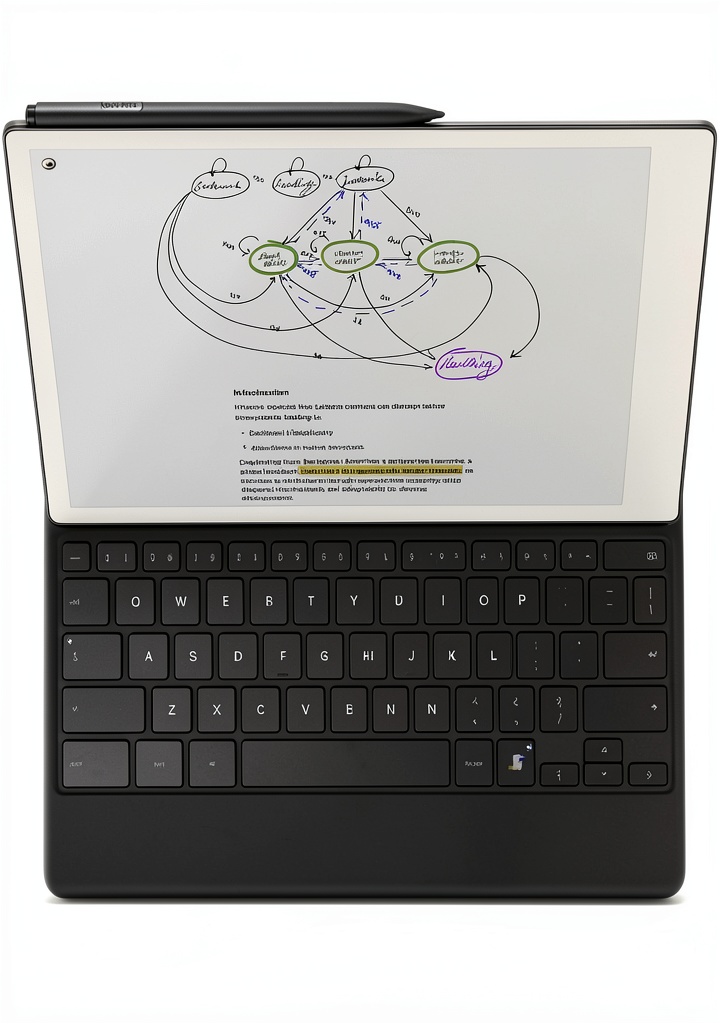
During a intensive research week where I needed to compile notes from various sources, the ability to switch between handwriting and typing on the same page proved transformative. I could quickly sketch diagrams and mind maps with the stylus, then immediately switch to typing detailed explanations without changing devices or applications. This fluidity between input methods is where the reMarkable Paper Pro with Type Folio genuinely distinguishes itself from alternatives.
The e-ink display’s refresh rate is optimized for writing rather than general computing. While this creates an excellent writing experience with minimal lag, it does mean that scrolling through longer documents or rapidly switching between notebooks feels slightly slower than on traditional tablets. This isn’t a dealbreaker for the intended use case, but it’s a noticeable trade-off if you’re accustomed to the instant responsiveness of LCD displays.
Ease of Use
The zero-setup keyboard is arguably the most user-friendly aspect of this combination. For users who are less technically inclined or simply want a device that works without configuration, the physical connection between tablet and keyboard eliminates what’s typically the most frustrating part of tablet keyboard setups. There’s no Bluetooth pairing process, no separate charging cable for the keyboard, and no connection drops during important writing sessions.
However, the reMarkable ecosystem has a learning curve. The organization system, while intuitive for basic note-taking, requires some adjustment if you’re coming from more established note-taking platforms. Creating folders, moving documents, and understanding the sync behavior takes a few days to master. The mobile app and desktop integration work reasonably well for document access, but the ecosystem feels more isolated than platforms like Evernote or Notion.
Durability & Reliability
After several weeks of daily use, including transportation in a backpack and use in various environments from coffee shops to office settings, the reMarkable Paper Pro with Type Folio has shown no signs of wear beyond expected minor scuffs on the folio exterior. The keyboard mechanism remains solid with no key wobble developing, and the tablet surface maintains its paper-like texture despite consistent stylus use.
The magnetic attachment between tablet and keyboard has proven secure enough for typical use, though I wouldn’t recommend carrying it by the keyboard alone when detached. The included stylus (sold separately from the base package) maintains excellent responsiveness, though replacement tips are a consumable item that will need occasional refreshing depending on your writing pressure and frequency.
 reMarkable Paper Pro Type Folio Keyboard Writing Tablet showing mixed handwriting and typing on same page” />
Pros & Cons
Pros:
- Genuinely distraction-free writing environment – No notifications, emails, or web browsing temptations
- Seamless input switching – Handwriting and typing on the same page works flawlessly
- Excellent keyboard experience – No pairing, charging, or connectivity issues
- Superior eye comfort – Paper-like display reduces strain during long sessions
- Impressive battery life – Weeks of use between charges for typical writing workloads
Cons:
- Monochrome display limitation – No color support for diagrams or highlighted text
- Ecosystem constraints – Limited to reMarkable’s environment without extensive app support
- Premium pricing – Positioned at the higher end of the writing tablet market
- Learning curve – Organization system requires adjustment period
- Limited multimedia – No audio recording or playback capabilities
Comparison & Alternatives
Cheaper Alternative: Boox Note Air3
The Boox Note Air3 provides similar e-ink writing functionality at a lower price point, with the added benefit of Android app support. While the writing experience is comparable, the keyboard integration isn’t as seamless—you’ll need to use Bluetooth pairing with separate charging. The Boox shines if you want access to more apps and services, but suffers from more potential distractions. Choose the Boox if budget is primary concern or you need app flexibility, but stick with reMarkable if you value the integrated, distraction-free keyboard experience.
Premium Alternative: iPad Pro with Magic Keyboard
The iPad Pro with Magic Keyboard represents the premium end of tablet computing, offering full-color display, extensive app ecosystem, and powerful processing capabilities. The writing experience with Apple Pencil is excellent, though the glass surface lacks the paper-like texture of the reMarkable. The critical trade-off is distraction—the iPad constantly tempts you with notifications, messages, and other apps. Choose iPad if you need a general-purpose computing device that also handles writing, but select reMarkable if your primary need is focused writing without digital interruptions.
Buying Guide / Who Should Buy
Best for beginners: If you’re new to digital note-taking but want a device that mimics the familiar experience of pen and paper while adding typing capability, the reMarkable Paper Pro with Type Folio offers an gentle learning curve. The lack of technical setup for the keyboard makes it accessible, and the focused nature prevents overwhelm from too many features.
Best for professionals: Writers, researchers, attorneys, and academics who need extended focused writing sessions will find the distraction-free environment invaluable. The ability to mix handwritten diagrams with typed content on the same page is particularly useful for complex projects that require both visual and textual elements.
Not recommended for: Users who need color displays for design work, those who require tight integration with specific productivity platforms beyond basic document export, or anyone who needs multimedia capabilities like audio recording during notes. Also not ideal as a primary computing device for general web browsing, email, or app usage.
FAQ
Can I use the reMarkable Paper Pro without the Type Folio keyboard?
Absolutely. The tablet functions perfectly as a standalone writing device with the stylus. Many users start with just the tablet and add the keyboard later if they find they need typing capability. The beauty is that you can use either input method independently or combine them seamlessly.
How does document export work with the mixed handwriting and typing?
When you export documents containing both handwriting and typed content, the system creates a PDF that preserves both elements exactly as they appear on your screen. The typed text isn’t converted to selectable text in the export—it remains as an image of the text. This means you can’t search the typed content in the exported PDF, which is an important limitation for some workflows.
Is the reMarkable Paper Pro with Type Folio worth the premium price?
This depends entirely on your writing habits and need for focus. If you frequently find yourself distracted by notifications and apps on traditional tablets or computers, and you regularly switch between handwriting and typing, the premium is justified. If you primarily use one input method or don’t struggle with digital distractions, a more basic e-ink tablet or traditional tablet might offer better value.
How does the keyboard attachment affect battery life?
Since the keyboard draws power directly through the physical connection rather than using Bluetooth and doesn’t have its own battery to charge, it has minimal impact on the tablet’s battery life. You’ll get essentially the same battery performance whether using the keyboard or not, which is a significant advantage over Bluetooth keyboard solutions.
Can I use this for word processing or just note-taking?
While you can certainly draft longer documents using the keyboard, the reMarkable lacks the advanced formatting options of dedicated word processors. It’s excellent for getting thoughts down and basic organization, but you’ll likely want to export to a proper word processor for final formatting and refinement of longer documents.