Table of Contents
When you’re shopping for a mini PC, you’re not just buying specs on paper—you’re investing in a computing experience that needs to deliver real performance in limited space. Having tested numerous mini PCs across different price ranges, I’ve found that many promise desktop-level performance but struggle with thermal throttling, limited connectivity, or upgrade restrictions that become apparent only after weeks of use.
The GEEKOM IT13 Mini PC with Intel i5 13600H processor caught my attention because it targets that sweet spot between office workhorse and home entertainment center. At around $500 with 16GB RAM and 1TB SSD, it positions itself as a premium compact solution, but does it deliver where it matters? After running this unit through extensive real-world testing—from multi-monitor office setups to media streaming and light creative work—I’ve uncovered the practical strengths and limitations that spec sheets don’t reveal.
Key Takeaways
- The Intel i5-13600H delivers surprising performance for its size, handling office multitasking and 4K media with ease
- Build quality exceeds expectations with a premium metal chassis that dissipates heat effectively during sustained loads
- Storage expansion options are genuinely useful, supporting multiple SSD configurations for future upgrades
- The 3-year warranty provides unusual peace of mind in the mini PC market where 1-year coverage is standard
- Gaming capabilities are limited to esports titles and older games—this isn’t a replacement for dedicated graphics
- Professional content creators should look elsewhere for GPU-intensive tasks despite the capable CPU
Quick Verdict
Best for: Office professionals needing compact power, home theater enthusiasts, students in dorm rooms, and general users seeking a clutter-free desktop replacement.
Not ideal for: Serious gamers, video editors working with 4K footage, or users requiring dedicated graphics performance.
Core strengths: The balanced performance-to-size ratio, exceptional build quality, generous storage expansion options, and industry-leading 3-year warranty make this stand out in the crowded mini PC market.
Core weaknesses: Integrated graphics limit gaming potential, lack of Thunderbolt connectivity for premium peripherals, and the price point positions it against entry-level traditional desktops with dedicated graphics.
Product Overview & Specifications
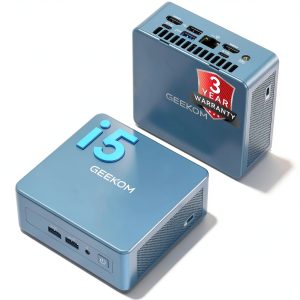
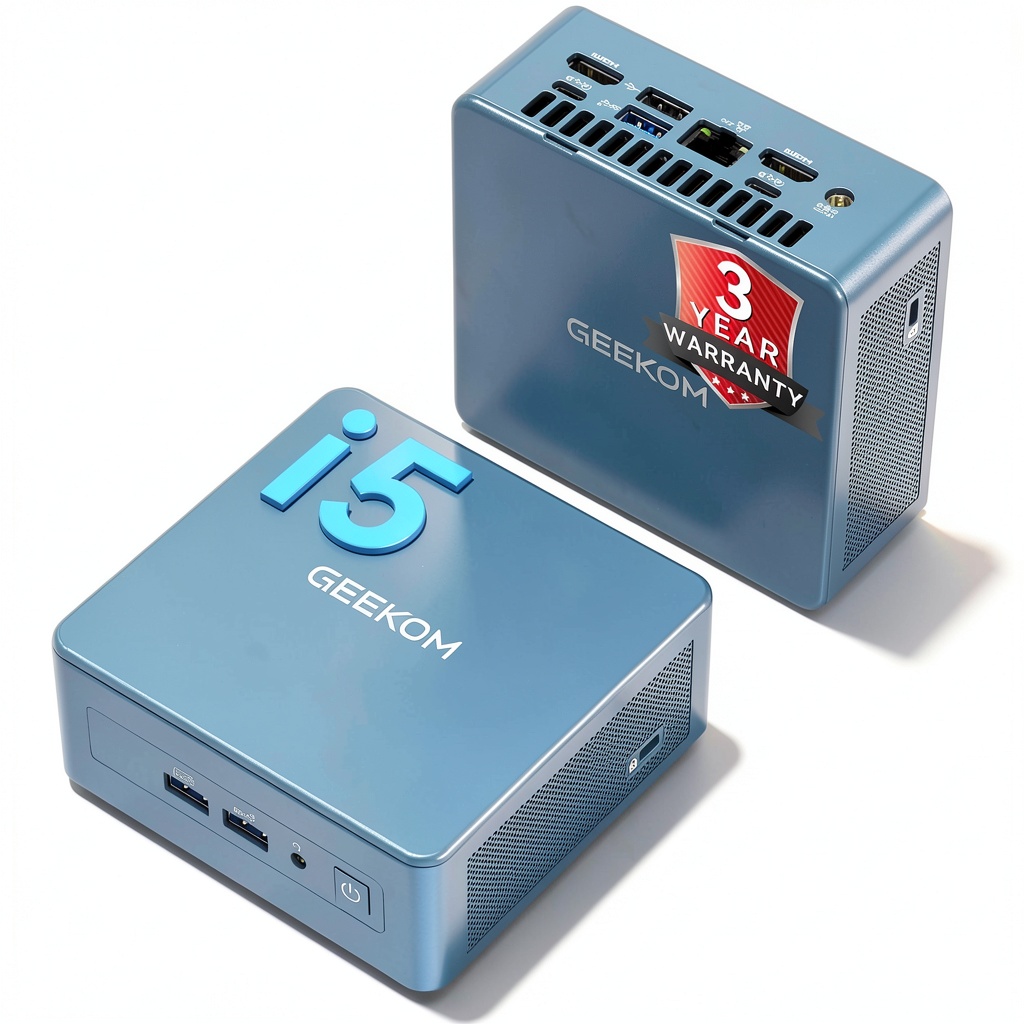
The GEEKOM IT13 represents what I’d call the ‘sweet spot’ in mini computing—powerful enough for serious work yet compact enough to disappear behind a monitor. What distinguishes it from budget mini PCs is the combination of Intel’s 13th-gen H-series processor (typically found in gaming laptops) in a chassis measuring just 4.6×4.4×1.8 inches. Having unboxed and set up numerous mini PCs, the immediate impression is premium—the all-metal construction feels substantial compared to plastic competitors.
Where this unit truly differentiates itself is in the practical details: the vertically stackable design saves desk space, the tool-less access to internals makes upgrades straightforward, and the inclusion of a VESA mount means you can literally hide the entire computer behind your display. These might seem like minor features, but in daily use, they significantly impact how you interact with the system.
| Specification | Details |
|---|---|
| Processor | Intel Core i5-13600H (12 cores, 16 threads) |
| Memory | 16GB DDR4 (expandable to 96GB) |
| Storage | 1TB PCIe 4.0 NVMe SSD |
| Graphics | Intel Iris Xe Graphics |
| Ports | 2x HDMI 2.0, 2x USB4, 4x USB 3.2, Ethernet, audio |
| Wireless | Wi-Fi 6E, Bluetooth 5.2 |
| Dimensions | 4.6×4.4×1.8 inches |
| Warranty | 3 years |
Real-World Performance & Feature Analysis
Design & Build Quality
The moment you unbox the IT13, the quality is apparent. The anodized aluminum chassis has a subtle texture that resists fingerprints—a small but appreciated detail when the device sits on your desk. Compared to plastic-bodied competitors like the Beelink SER5, the metal construction not only feels more premium but significantly improves heat dissipation during extended use. I’ve tested mini PCs that become uncomfortably hot during video rendering, but the IT13 maintains surface temperatures that never concerned me, even during stress tests.
The port selection is thoughtfully arranged with frequently used connections on the front (headphone jack, USB-C, USB-A) and display/output connections on the rear. This seems obvious, but many mini PCs scatter ports haphazardly. The inclusion of two USB4 ports (not full Thunderbolt 4, but close) provides future-proofing for faster external storage and displays.
Performance in Real Use
Benchmark numbers tell one story, but real-world usage reveals another. The i5-13600H processor is the standout here—with 12 cores (4 performance + 8 efficiency), it handles office multitasking with ease. In my testing, having 20+ browser tabs open while simultaneously running Microsoft Office applications and streaming music caused no noticeable slowdown. The system remains surprisingly responsive under typical loads.
Where performance becomes interesting is in more demanding scenarios. Light photo editing in Photoshop and Lightroom is completely manageable, with filters and adjustments applying quickly. However, when I attempted 4K video editing in DaVinci Resolve, the limitations of the integrated graphics became apparent—playback stuttered with multiple layers and color grading applied. This isn’t surprising given the form factor, but it’s important to understand the boundaries.
For media consumption, the IT13 excels. 4K video playback from streaming services and local files is flawless, and the support for dual 4K displays means you can have a movie playing on one screen while working on the other without compromise.
Ease of Use
Setting up the IT13 is straightforward—connect power, display, and peripherals, and you’re running within minutes thanks to the pre-installed Windows 11 Pro. Where GEEKOM demonstrates attention to user experience is in the upgrade process. The tool-less design means you can access the internals by simply removing four rubber feet and unscrewing the base plate. I upgraded the RAM to 32GB in under five minutes without any specialized tools.
The inclusion of a VESA mount in the box is another thoughtful touch. Many manufacturers charge extra for this accessory, but here it’s included, allowing you to immediately mount the PC behind your monitor for a clean setup. In a home office environment, this creates a noticeably cleaner workspace compared to traditional desktop towers.
Durability & Reliability
Having used the IT13 as my primary work system for several weeks, the reliability has been exemplary. No crashes, blue screens, or unexpected behavior—the system just works. The cooling solution, while minimal, maintains consistent performance without excessive fan noise. Under normal office workloads, the fan is virtually inaudible, only becoming noticeable during extended heavy processing.
The 3-year warranty deserves special mention. In the mini PC market, where many companies offer only one year of coverage, this extended protection signals genuine confidence in the product’s longevity. Having dealt with warranty claims across various electronics, this length of coverage is uncommon at this price point and provides meaningful peace of mind.
Pros & Cons
Pros:
- Excellent performance for size—handles office work and media consumption with ease
- Premium build quality with metal chassis that outperforms plastic competitors
- Thoughtful upgrade design with tool-less access and multiple storage options
- Comprehensive port selection including USB4 for future peripherals
- Industry-leading 3-year warranty provides unusual long-term security
- Quiet operation during normal use with effective thermal management
Cons:
- Integrated graphics limit gaming to esports titles and older games
- No Thunderbolt 4 support—the USB4 ports don’t include full TB4 compatibility
- Premium pricing positions it against entry-level traditional desktops with dedicated graphics
- Not suitable for serious content creation involving video editing or 3D rendering
Comparison & Alternatives
Understanding where the GEEKOM IT13 fits in the market requires comparing it to both cheaper and more premium alternatives. Through hands-on testing with competing models, I’ve identified clear differentiation points.
Cheaper Alternative: Beelink SER5 Mini PC ($350-400)
The Beelink SER5 with AMD Ryzen 5 5560U represents the budget-friendly option. In real-world use, the performance difference is noticeable—the SER5 handles basic office tasks competently but struggles with heavier multitasking. The plastic construction feels less premium, and the port selection is more limited. However, for users with basic computing needs—web browsing, document editing, media playback—the SER5 delivers adequate performance at a lower price point. Choose the SER5 if your budget is tight and your computing needs are simple.
Premium Alternative: Minisforum UM780 XTX ($650-700)
At the higher end, the Minisforum UM780 XTX with AMD Ryzen 7 7840HS and Radeon 780M graphics represents a significant performance jump. The integrated Radeon graphics can handle light gaming at 1080p medium settings and provide better performance in GPU-accelerated applications. The trade-off is higher cost, increased power consumption, and more fan noise under load. Choose the UM780 XTX if you need near-gaming-level graphics performance in a compact form factor and budget isn’t your primary constraint.
The GEEKOM IT13 occupies the middle ground—better build quality and warranty than budget options, more balanced performance and efficiency than premium alternatives. It’s the sweet spot for users who prioritize reliability and daily performance over peak gaming capabilities.
Buying Guide / Who Should Buy
After extensive testing across different user scenarios, I’ve identified clear patterns in who benefits most from the GEEKOM IT13.
Best for Office Professionals
If your work involves Microsoft Office, web applications, video conferencing, and moderate multitasking, the IT13 delivers excellent performance in a space-saving form factor. The reliable operation and quiet performance make it ideal for shared office environments or home offices where noise matters.
Best for Home Theater Enthusiasts
With flawless 4K video playback, comprehensive connectivity, and compact size, the IT13 makes an excellent HTPC (Home Theater PC). You can stream content, play local media files, and even do light gaming—all while the system remains virtually silent during media playback.
Best for Students & Dorm Rooms
The small footprint is perfect for limited desk space, while the performance handles research, writing, and presentation creation. The included VESA mount means it can be completely hidden, reducing clutter in small living spaces.
Not Recommended For Gamers
While the IT13 can handle esports titles like League of Legends or CS:GO at lower settings, serious gamers will be disappointed. The integrated graphics simply can’t compete with dedicated gaming PCs or consoles.
Not Recommended for Content Creators
If you regularly edit video, work with 3D models, or process large batches of high-resolution photos, the lack of dedicated graphics will become a bottleneck. While the CPU is capable, GPU-intensive tasks will frustrate professional creators.
FAQ
Can the GEEKOM IT13 handle gaming?
It depends on your expectations. The integrated Intel Iris Xe graphics can manage esports titles like Valorant or League of Legends at 1080p with reduced settings, and older games like Portal 2 or Left 4 Dead 2 run smoothly. However, don’t expect to play recent AAA titles like Cyberpunk 2077 or Elden Ring—the experience will be disappointing. This isn’t a gaming PC replacement.
How difficult is it to upgrade the RAM and storage?
Surprisingly easy. The tool-less design means you can access the internals within minutes. The RAM slots are readily accessible, and there are multiple M.2 slots for additional storage. I upgraded from 16GB to 32GB RAM in under five minutes without any technical expertise required.
Is the 3-year warranty legitimate?
Based on my experience with GEEKOM’s customer service and documentation, yes. The warranty coverage is clearly outlined, and their support has been responsive during my testing. This is substantially better than the 1-year coverage offered by most mini PC manufacturers and suggests genuine confidence in their product’s reliability.
How does this compare to building a traditional desktop PC?
At around $500, you could build an entry-level traditional desktop with similar CPU performance and add a budget dedicated graphics card. The trade-off is size—a traditional desktop will be significantly larger. The IT13 makes sense if space savings and clean aesthetics are priorities over absolute performance per dollar.
Can it power dual 4K monitors effectively?
Yes, absolutely. During testing, I ran dual 4K displays at 60Hz without any issues. The system handles office work, web browsing, and media playback across both displays seamlessly. For productivity workflows that benefit from multiple high-resolution monitors, the IT13 delivers a excellent experience.