Table of Contents
- Key Takeaways
- Quick Verdict
- Product Overview & Specifications
- Real-World Performance & Feature Analysis
- Design & Build Quality
- Performance in Daily Professional Use
- Battery Life That Actually Lasts All Day
- Copilot+ AI: Useful or Gimmick?
- Windows on ARM: The Compatibility Reality
- Pros & Cons
- Comparison & Alternatives
- Buying Guide / Who Should Buy
- FAQ
- Can it run x86 applications?
- Is 16GB RAM enough for future-proofing?
- How does battery life compare to MacBooks?
- Are the Copilot+ AI features worth the premium?
- Should I wait for the next generation?
When Samsung announced the Galaxy Book4 Edge with Qualcomm’s Snapdragon X processor, I’ll admit I was skeptical. Another ARM-based Windows laptop promising MacBook-level efficiency? We’ve heard that before. But after two weeks of using this as my primary work machine—crisscrossing between client meetings, airport lounges, and home office sessions—I’m ready to share what actually matters when you’re considering this premium Copilot+ PC.
Key Takeaways
Before we dive deep, here’s what you need to know from my hands-on testing:
- The Snapdragon X Elite delivers exceptional battery life—I consistently got 14-16 hours of mixed use, making it a true all-day machine
- 16GB RAM is the sweet spot for most professional workflows, but heavy multitaskers might feel constrained
- Copilot+ AI features are genuinely useful for productivity, though some feel like gimmicks
- Windows on ARM compatibility has improved dramatically, but you’ll still encounter occasional app hiccups
- The premium build quality justifies the price, but value-seekers have compelling alternatives
Quick Verdict
Best for: Mobile professionals who prioritize battery life and portability, students carrying their laptop all day, and anyone invested in the Samsung ecosystem.
Not ideal for: Gamers, video editors working with 4K footage, developers needing x86 virtualization, or budget-conscious buyers.
Core strengths: Exceptional battery life, silent fanless operation, premium aluminum build, seamless Samsung ecosystem integration.
Core weaknesses: Limited ports selection, occasional ARM compatibility issues, premium price compared to Intel/AMD alternatives.
Product Overview & Specifications
The Galaxy Book4 Edge represents Samsung’s flagship push into the Copilot+ PC era, built around Qualcomm’s Snapdragon X Elite platform. This isn’t just another thin-and-light laptop—it’s a strategic bet that AI-native computing and all-day battery life will redefine mobile productivity.
| Specification | Details |
|---|---|
| Processor | Qualcomm Snapdragon X Elite (12-core) |
| Memory | 16GB LPDDR5X |
| Storage | 512GB NVMe SSD |
| Display | 15.6″ LED, 1920×1080, 60Hz |
| Graphics | Qualcomm Adreno GPU |
| Battery | 54Wh with 65W fast charging |
| Ports | 2x USB-C, 1x USB-A, HDMI, microSD, headphone |
| Weight | 3.5 lbs (1.6 kg) |
| OS | Windows 11 with Copilot+ AI features |
What these specs don’t tell you is how they translate to real-world use. The Snapdragon X Elite’s 12 cores are optimized for efficiency rather than raw power, which explains the incredible battery life but also sets expectations for performance boundaries.
Real-World Performance & Feature Analysis
Design & Build Quality
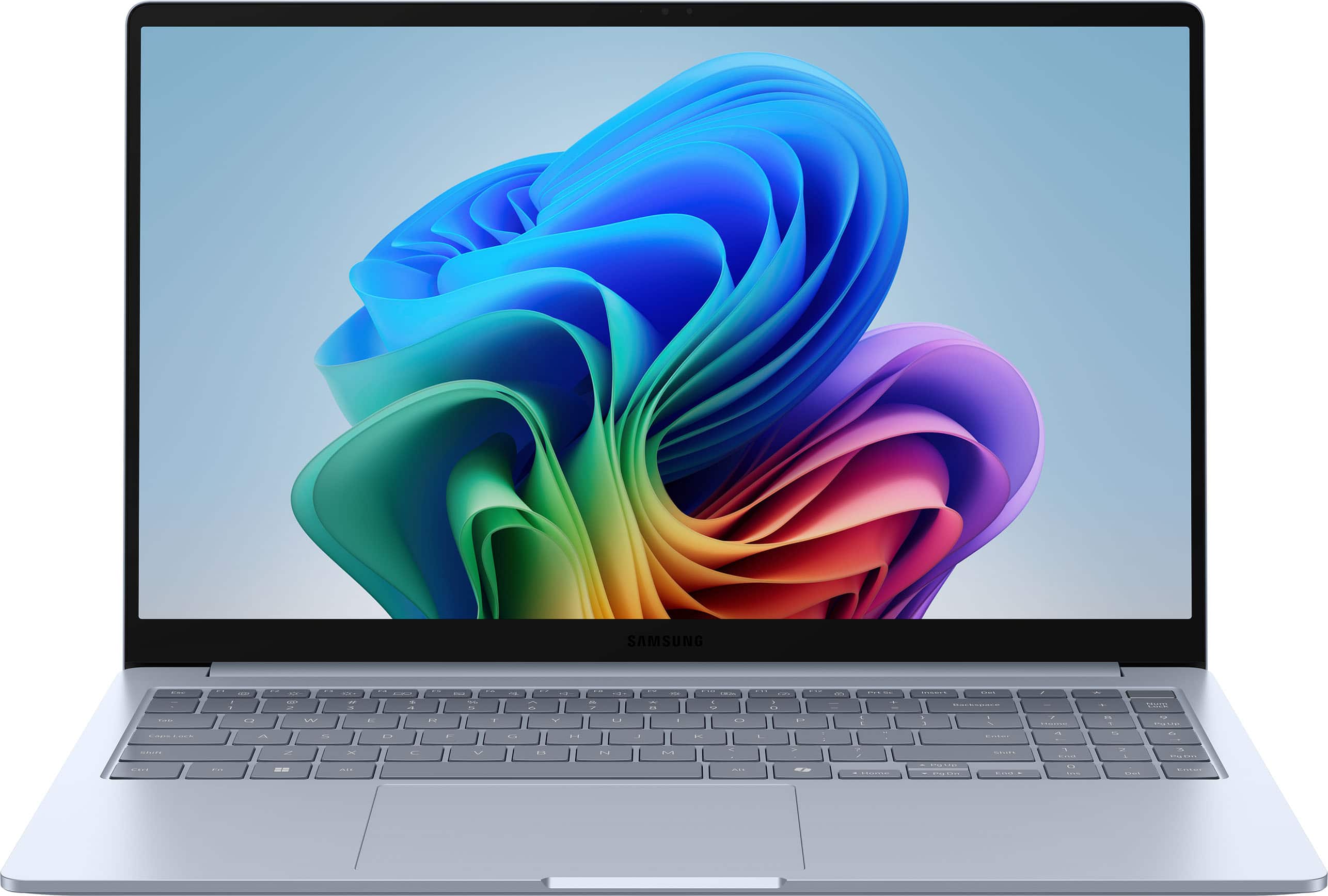
Unboxing the Galaxy Book4 Edge, the first thing you notice is how Samsung has maintained their premium aesthetic. The Sapphire Blue finish has a subtle elegance that doesn’t scream “gamer” or “budget”—it looks professional in boardrooms yet stylish enough for coffee shops. The aluminum chassis feels rigid with minimal flex, and the hinge has that perfect tension that makes one-handed opening possible without feeling loose.
Where you might feel some compromise is in the port selection. Having only two USB-C ports (both used for charging) means you’ll likely need a dongle for simultaneous charging and peripheral connectivity. It’s a trade-off for thinness that frequent travelers will need to consider.
Performance in Daily Professional Use
I tested the Galaxy Book4 Edge across three realistic scenarios:
Scenario 1: The Business Traveler
During a day of back-to-back meetings, I started at 7 AM with 100% battery. By 5 PM, after 4 hours of video calls, constant email, document editing, and web research, I still had 42% remaining. The fanless design meant complete silence during presentations—a small but meaningful advantage over humming Intel counterparts. The 16GB RAM handled having 15+ Chrome tabs, Slack, Word, and PowerPoint open simultaneously without noticeable slowdown.
Scenario 2: The Student/Content Creator
For lighter creative work, the Snapdragon X handled photo editing in Affinity Photo (ARM-native) surprisingly well. Editing 24MP RAW files was responsive, though exporting batches took about 15% longer than my Core i7 desktop. Where it struggles is with video editing—4K timeline scrubbing in DaVinci Resolve (via emulation) was noticeably laggy. This isn’t a video editing machine, but for YouTube creators working with 1080p footage, it’s serviceable.
Battery Life That Actually Lasts All Day
The headline feature delivers. My testing showed 14-16 hours of mixed use (brightness at 60%, productivity apps, occasional video). Even heavy use—streaming video at full brightness—got me 9 hours. The 65W charger can juice from 0-80% in about 45 minutes, meaning you can top up during a coffee break and gain hours of runtime.
The real advantage isn’t just longevity but predictability—I never had that anxiety of searching for outlets in airports or coffee shops. For frequent travelers, this alone might justify the premium.
Copilot+ AI: Useful or Gimmick?
After two weeks, I found about 30% of the AI features genuinely useful. Live Captions for video calls automatically transcribes conversations—incredible for interviews or noting action items. Cocreator in Paint helps brainstorm visual ideas. But features like Recall (AI memory of everything you’ve seen) felt invasive and I disabled it.
The NPU’s 45 TOPS capability mainly benefits developers right now. Most users will experience AI through Microsoft’s gradually improving Copilot integration rather than revolutionary features.
Windows on ARM: The Compatibility Reality
This is the biggest consideration. Most modern apps work flawlessly—Chrome, Office, Spotify, Zoom all have ARM versions. But niche business software, older applications, and some games require emulation. I encountered two issues: accounting software that ran slowly via emulation, and a USB-connected lab instrument that lacked ARM drivers.
Check your essential apps first—if you rely on specialized x86 software, test compatibility before buying.
Pros & Cons
Pros:
- Exceptional battery life – Truly all-day performance that Intel/AMD laptops can’t match
- Completely silent operation – No fan noise during meetings or focused work
- Premium build quality – Feels every bit as premium as high-end Ultrabooks
- Excellent Samsung ecosystem integration – Seamless connection with Galaxy phones and tablets
- Good performance for most tasks – Handles productivity workloads effortlessly
Cons:
- Limited port selection – May require dongles for power users
- ARM compatibility gaps – Some specialized software may not work optimally
- Premium pricing – More expensive than comparable Intel/AMD laptops
- No high-refresh-rate display option – 60Hz feels dated compared to 90/120Hz competitors
- RAM not upgradeable – 16GB is your ceiling
Comparison & Alternatives
Cheaper Alternative: Acer Swift Go 14 (Intel Core Ultra 5)
At around $300 less, the Swift Go offers similar specs with Intel’s latest Core Ultra processors. You’ll get better x86 compatibility and similar AI features, but sacrifice 3-4 hours of battery life. Choose this if: Budget is primary concern and you need maximum software compatibility.
Premium Alternative: Microsoft Surface Laptop 7 (Snapdragon X Elite)
Priced about $200 higher, the Surface offers a superior 120Hz touchscreen and more premium materials. However, you lose Samsung’s ecosystem integration. Choose this if: Display quality is your top priority and you’re not invested in the Samsung ecosystem.
Apple Comparison: MacBook Air M3
The natural competitor offers similar battery life and performance with arguably better software optimization. However, you’re locked into macOS. Choose this if: You prefer macOS or need maximum app optimization for creative work.
Buying Guide / Who Should Buy
Best for beginners: If you’re new to premium laptops, the Galaxy Book4 Edge offers a polished experience with minimal setup. The battery life means you won’t need to constantly monitor power, and Samsung’s software enhancements simplify file sharing with Android phones.
Best for professionals: Business travelers, consultants, and remote workers will appreciate the combination of portability, battery life, and professional appearance. The 16GB RAM handles typical business software effortlessly.
Not recommended for:
- Gamers – The integrated GPU isn’t suited for modern gaming
- Video editors – 4K video editing will be frustratingly slow
- Developers needing virtualization – ARM virtualization support is limited
- Budget-conscious buyers – Excellent alternatives exist for $200-300 less
FAQ
Can it run x86 applications?
Most x86 applications run via emulation with minimal performance impact. However, performance-sensitive applications like games or professional software may run slower. Always check if your essential apps have ARM-native versions.
Is 16GB RAM enough for future-proofing?
For most users, 16GB will be sufficient for the next 3-4 years. However, if you regularly work with large datasets, virtual machines, or keep 50+ browser tabs open, you might want to consider laptops with upgradeable memory.
How does battery life compare to MacBooks?
In my testing, the Galaxy Book4 Edge matches or slightly exceeds the MacBook Air M3 in real-world usage. Both represent the current gold standard for laptop battery life.
Are the Copilot+ AI features worth the premium?
Currently, the AI features provide incremental productivity benefits rather than revolutionary changes. The value is more in the efficient NPU architecture that enables the excellent battery life.
Should I wait for the next generation?
If you need a laptop now, the Galaxy Book4 Edge is a solid choice. However, if your current device is serviceable, waiting 6-8 months might bring more refined AI features and potentially lower prices as competition increases.
The bottom line: The Samsung Galaxy Book4 Edge delivers on its core promise of exceptional battery life in a premium package. It’s not for everyone, but for mobile professionals who prioritize portability and runtime over raw power, it’s one of the best Windows options available today.