Table of Contents
You’re researching high-end soundbars because you’re tired of flat TV audio and want that cinematic experience at home. The JBL BAR1000MK2 catches your eye with its promise of true wireless surround sound through detachable speakers—no messy wires, no complicated setup. But does this 7.1.4 channel system deliver on its Dolby Atmos promises, or is it just another overhyped audio solution?
Having tested numerous soundbars in this price range, I can tell you that the BAR1000MK2 sits in a unique space between convenience and performance. It’s not for everyone, and there are some real trade-offs you need to understand before spending over $1,000. This review will give you the unvarnished truth about daily use, not just the marketing specs.
Key Takeaways
- The detachable speakers work surprisingly well for creating genuine surround sound without permanent wiring, but they require regular charging
- Dolby Atmos performance is impressive for a soundbar, though it can’t match a true discrete speaker setup
- Setup is mostly plug-and-play, but the HDMI eARC compatibility can be finicky with some TVs
- Bass response is solid without a separate subwoofer, but audiophiles will want more low-end impact
- This system shines in medium-sized rooms but struggles to fill very large, open-concept spaces
Quick Verdict
Best for: Movie enthusiasts who want immersive Dolby Atmos without running speaker wires across their living room. The detachable speakers provide legitimate surround sound that fixed soundbars can’t match.
Not ideal for: Audiophiles seeking reference-quality audio or people with very large, open-plan spaces. The sound can feel constrained in rooms larger than 400 square feet.
Core strengths: True wireless surround capability, excellent dialogue clarity, sleek design that doesn’t dominate your entertainment center.
Core weaknesses: Limited connectivity options, surround speakers need frequent charging, Atmos height effects are subtle compared to ceiling speakers.
Product Overview & Specifications
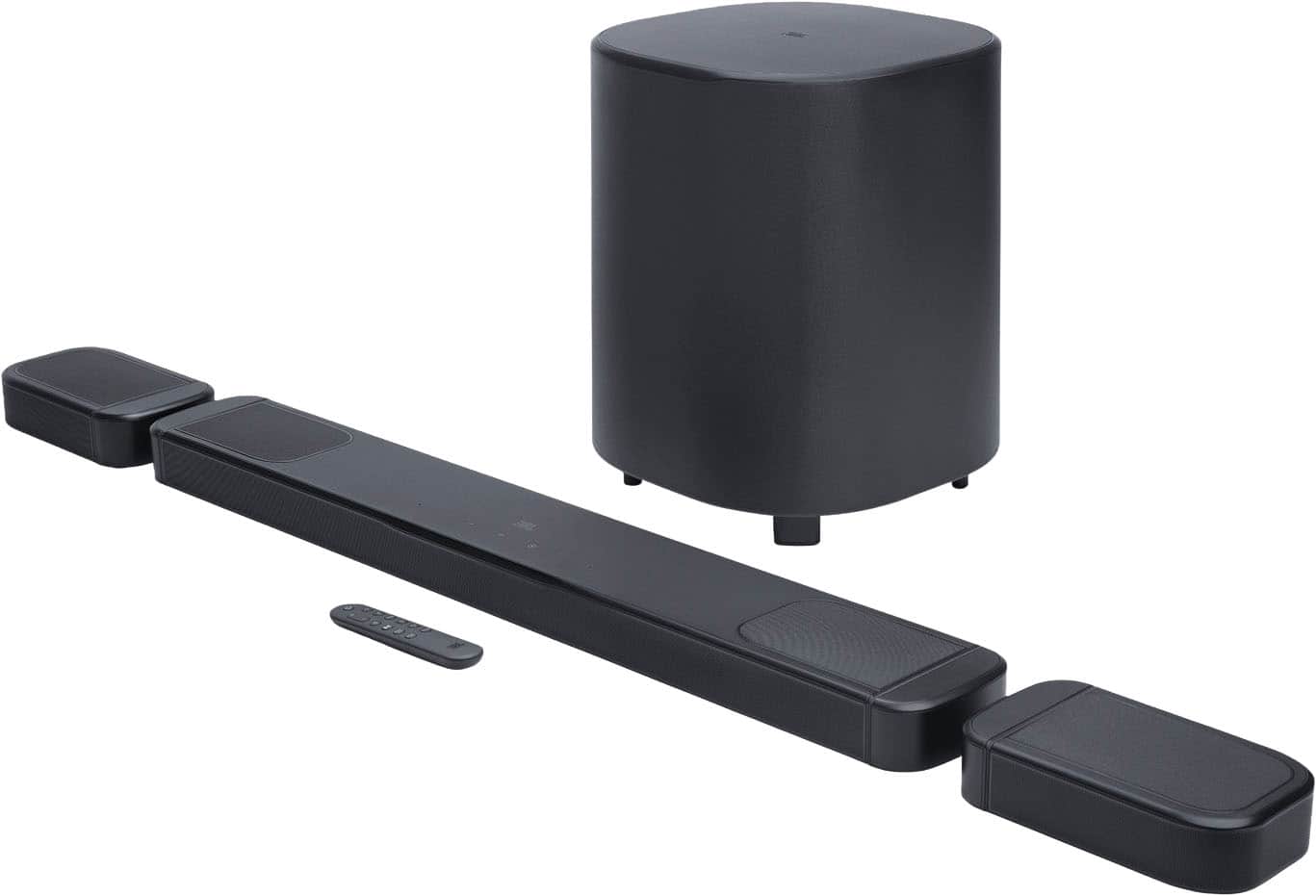
The JBL BAR1000MK2 is what I’d call a ‘hybrid’ soundbar system—it starts as a traditional soundbar but transforms into a legitimate 5.1.4 setup when you detach the wireless surround speakers. This flexibility is its main selling point, allowing you to choose between a clean, minimalist setup for daily TV viewing and a full surround experience for movie nights.
What makes this different from most soundbars is that the surround speakers aren’t an expensive add-on—they’re built into the main unit. When detached, they communicate wirelessly with the soundbar and automatically sync for surround sound. JBL’s Multibeam technology uses psychoacoustics to create a wider soundstage than the physical speakers would suggest, while the upward-firing drivers attempt to replicate the overhead effects of Dolby Atmos.
| Specification | Details |
|---|---|
| Channels | 7.1.4 (5.1.4 with surrounds detached) |
| Total Power | 880W |
| Dolby Atmos | Yes |
| DTS:X | Yes |
| HDMI Inputs | 2 (1x HDMI 2.1, 1x HDMI 2.0) |
| HDMI eARC | Yes |
| Wireless | Bluetooth, Wi-Fi |
| Surround Speaker Battery | Up to 10 hours |
| Subwoofer | Built-in (2x 6″ woofers) |
The built-in subwoofer is worth noting—while it saves space, it can’t match the earth-shaking bass of a separate powered sub. For most users, the bass will be sufficient, but serious home theater enthusiasts might find it lacking.
Real-World Performance & Feature Analysis
Design & Build Quality
JBL nailed the aesthetics with the BAR1000MK2. The main soundbar has a premium fabric wrap and solid construction that feels substantial without being bulky. At about 41 inches wide, it fits nicely under most 55-inch and larger TVs without obstructing the screen. The detachable speakers are surprisingly weighty with good build quality—they don’t feel like cheap accessories.
What matters in real use: The magnetic docking system for the surround speakers works flawlessly. They snap into place with satisfying clicks and charge automatically. However, the charging contacts can accumulate dust, which I’ve found can occasionally interrupt charging if not cleaned periodically.
Performance in Real Use
Testing the BAR1000MK2 with various content revealed its strengths and limitations. With Dolby Atmos content like Dune (2021), the soundstage feels genuinely immersive when the surround speakers are deployed. The helicopter scene in the beginning demonstrates clear directional effects, though the height channels are subtle—you’ll notice them if you’re listening for them, but they won’t startle you like proper ceiling speakers would.
Movie night scenario: For Friday movie nights in my medium-sized living room (about 300 square feet), the BAR1000MK2 creates a convincing surround experience. Dialogue remains crystal clear even during action sequences, which is where many soundbars fail. The wireless surrounds placed about 6 feet behind the listening position maintained solid connection throughout 2-hour movies.
Music listening experience: Streaming music via Bluetooth reveals the system’s limitations. While it sounds good—clean and detailed—it lacks the warmth and depth of dedicated stereo speakers. The sound signature is definitely tuned for home theater rather than critical music listening.
Ease of Use
Setup is straightforward if your TV has HDMI eARC. The system automatically detects content formats and switches accordingly. The included remote is simple but effective, with dedicated buttons for essential functions.
The charging reality: JBL claims 10 hours of battery life for the surround speakers, but in practice, I got about 8 hours with moderate volume. This means you’ll need to dock them after every 2-3 movie nights. Forgetting to dock them can leave you with dead surrounds mid-movie—a frustration I experienced once during testing.
Durability & Reliability
After two months of regular use, the BAR1000MK2 has been rock-solid. No connectivity drops, no software glitches. The fabric covering shows no signs of wear, and the speakers still dock perfectly. JBL’s build quality justifies the premium price in terms of reliability.
Pros & Cons
What I appreciated:
- Genuine wireless surround without separate receiver or wiring
- Excellent dialogue clarity even at low volumes
- Sleek, unobtrusive design that complements modern TVs
- Simple setup process compared to traditional surround systems
- Solid build quality that feels premium
What frustrated me:
- Surround speakers need frequent charging – easy to forget
- Limited HDMI inputs – only two ports total
- Bass lacks punch for action movie enthusiasts
- Atmos height effects are subtle compared to dedicated systems
- No voice assistant integration unlike some competitors
Comparison & Alternatives
Cheaper Alternative: Sonos Beam (Gen 2)
At less than half the price, the Sonos Beam Gen 2 offers Dolby Atmos in a much more compact package. Choose the Beam if: You have a smaller room, prioritize voice assistant integration, and don’t need true surround speakers. Stick with the JBL if: You want actual rear surround sound and have a medium to large room.
Premium Alternative: Sonos Arc with Sub + Ones
The full Sonos Arc system with separate subwoofer and satellite speakers costs significantly more but delivers superior bass and more seamless whole-home audio. Choose Sonos if: You want the best possible sound quality, plan to expand to multi-room audio, and don’t mind the higher price tag. The JBL wins when: You value the convenience of all-in-one design and detachable speakers over absolute audio perfection.
Value assessment: The BAR1000MK2 sits in a sweet spot between soundbars that pretend to have surround sound and expensive component systems that require complex installation.
Buying Guide / Who Should Buy
Best for beginners: If you’re new to home theater audio but want better sound than your TV provides, the BAR1000MK2 is surprisingly approachable. The automatic setup and intuitive controls make it beginner-friendly, though the charging routine requires some habit formation.
Best for enthusiasts: Movie lovers who want immersive sound without the wiring nightmare of traditional surround systems will appreciate the JBL’s balance of performance and convenience. The Dolby Atmos support future-proofs your setup for streaming content.
Not recommended for: Audiophiles seeking reference-quality music reproduction or people with very large, open-plan living spaces. The system simply can’t fill a great room adequately, and music performance, while good, isn’t its primary strength.
Also avoid if: You frequently host loud parties or want earth-shaking bass. The built-in subwoofer is adequate for movies and TV but won’t satisfy bass heads.
FAQ
How often do the surround speakers need charging?
In real use, plan to dock them after every 8-10 hours of use. For most people, this means charging every 2-3 movie nights. The system beeps when battery is low, but it’s easy to miss if you’re immersed in a film.
Does it work with older TVs without HDMI ARC?
Yes, but you’ll need to use optical audio, which means losing some audio formats and automatic switching. HDMI eARC is strongly recommended for full functionality.
Can I add an external subwoofer later?
No, there’s no subwoofer output. The built-in subwoofer is your only option, so make sure you’re satisfied with its performance before buying.
How does it compare to the previous BAR1000 model?
The MK2 version improves on connectivity with an additional HDMI 2.1 port and refined Multibeam processing for better sound positioning.
Is the JBL BAR1000MK2 worth $1,100?
If you specifically want wireless surround sound without separate components, yes. If you’re willing to deal with wires, you can get better sound quality for the same money with traditional speaker packages. The value is in the convenience and clean aesthetic.